











|
Try before you buy: it's free
|
|
||||||||||||||||||||||||||||||||||||||||||||||||||||||||||||||||||||||||||||||||||||||||||||||||||||||||||||||||||||||||||||||||||||||||||||||||||||||||||||||||||||||||||||||||||||||||||||||||||||||||||||||||||||||||||||||||||||||||||||||||||||||||||||||||||||||||||||||||||||||||||||||||||||||||||||||||||||||||||||||||||||||||||||||||||||
We lead the pack! More formats, more camera models supported, from Windows XP SP3 to Windows 10, all editions 32 and 64 bit: you can't go wrong with the FastPictureViewer Codec Pack! Maximum compatibility guaranteed(*).The FastPictureViewer Codec Pack adds fast thumbnail and preview support to Microsoft Windows for many image formats, including RAW formats from more than 580 digital cameras, Photoshop PSD, OpenEXR, TGA, DDS, HDR, Maya IFF, SGI RGB, JPEG 2000 and more! The Codec Pack is compatible with Windows 10 Desktop, Windows 8.x Desktop, Windows 7, Windows Vista and Windows XP SP3 and also creates thumbnails for Google SketchUp, Adobe InDesign, Adobe Illustrator, EPS and Adobe PDF-XMP.Find all your images visually, directly in Windows Explorer just like JPEGs, without the need to launch any program!
New for version 3.8: Got a new digital camera not supported by your version of Adobe Photoshop®? The FastPictureViewer Codec Pack helps bridge the gap: open any raw image supported by the FastPictureViewer Codec Pack in most versions of Adobe Photoshop® using the included FastPictureViewer Import Plug-in for Adobe Photoshop®. More features, same low price!
|
||||||||||||||||||||||||||||||||||||||||||||||||||||||||||||||||||||||||||||||||||||||||||||||||||||||||||||||||||||||||||||||||||||||||||||||||||||||||||||||||||||||||||||||||||||||||||||||||||||||||||||||||||||||||||||||||||||||||||||||||||||||||||||||||||||||||||||||||||||||||||||||||||||||||||||||||||||||||||||||||||||||||||||||||||||
The FastPictureViewer Codec Pack contains image decoders (codecs) that enables robust support for 45+ image formats, including RAW formats from more than 580 digital cameras in Windows Explorer, Windows Photo Gallery, Windows Photo Viewer, Windows Live™ Photo Gallery and, on Windows 7, 8.1 and 10, also within Windows Media Center and Windows Media Player 12, with full 64-bit compatibility.The Codec Pack supports raw formats from digital cameras from Canon, Nikon, Olympus, Sony, Hasselblad, Fuji, Panasonic, Leica and more, as well as Adobe DNG, Photoshop PSD, Google SketchUp (thumbnails), and Computer Graphics image formats including OpenEXR, Radiance HDR, TGA, Softimage PIC, Autodesk Maya IFF, PNM, and DirectX DDS including ATI 3Dc compression. See full list below.(*) Due to technical limitations currently imposed by Microsoft for their WinRT platform, the FastPictureViewer Codec Pack decoders are not exposed to "Metro" aka "Modern" aka "Windows Store" applications at this time, as they elected to block non-Microsoft codecs for those apps. |
|
Companies like Disney, Electronic Arts, Sony and Kaspersky Lab purchased this product: they trust us, you can too!A sample of our corporate customers:


|
|
|
Need any more convincing? Try for yourself, on your own computer, with your own files:Click Here To Download Our Free 15-Day Trial Edition (No questions asked free trial, fully un-installable from Control Panel Add/Remove Software) |
|
Our codecs expose EXIF/IPTC metadata where applicable so Windows Explorer is able to display information such as shutter speed, F-stop, ISO and date taken, as illustrated below. Integration with Windows Search let users find their images instantly from any Explorer search prompt, for example by camera model, date and more. Fast extraction of JPEG preview images embedded within raw files enables near-instant previewing of most supported raw formats. Thumbnail extraction from most recent XMP-enabled Adobe InDesign (INDD) and Adobe Illustrator (AI) files is supported, as well as EPS TIFF previews.Running Windows 7 with Media Center and have an Xbox 360 or another Media Center Extender? Wirelessly stream your images - including RAW files - straight from your 64-bit PC to your living room TV set, with EXIF-based auto-rotation, thanks to our product's uncompromised Windows compatibility! Why the FastPictureViewer Codec Pack?
User quotes:“JUST BRILLIANT - you have completely transformed Windows 7 for me” – Paul Lawrence, United Kingdom (via email) “The FastPictureViewer Codec Pack is much faster at decoding CR2 raw images [...]” – Microsoft Research, Image Composite Editor (ICE) | |
Some of our most distinguished corporate customers includes:
Sony Online Entertainment, Electronic Arts, Orbit Studio, Blizzard Entertainment, Avid Technology, Hidden Path
Entertainment, as well as countless photo
studios, graphic and game artist's studios, imaging
professionals and
photographers all around the world.
Product description & installation guide (Vista screenshots, the Codec Pack works similarly on Windows 7/8/10)
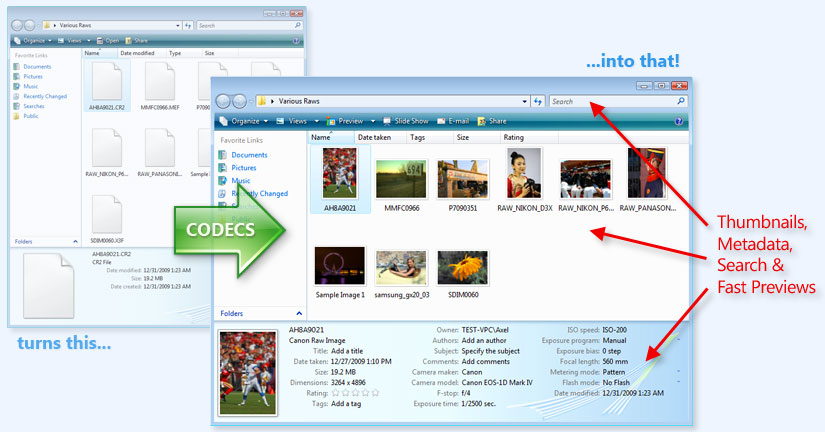
Beware of imitations: the FastPictureViewer Codec Pack delivers true Windows-compliant image decoders that enable the full RAW viewing experience in Windows Vista and Windows 7, including extra-large thumbnails and fast, large size previewing and slideshows, as well as EXIF metadata display in Windows Explorer and full integration with Windows Search, which let users locate RAW files by author, tags, camera model, date taken etc., instantly, from any Explorer "search" box in Windows Vista or Windows 7. Last but not least, our product enable raw support in Windows Media Center 6.1 (the version that ships with Windows 7), including support for Media Center Extenders (stream slideshows to TV w/Xbox 360).
Check out our short video demonstrating the easy installation procedure and benefits of the FastPictureViewer Codec Pack on Windows 7, Windows Vista and Windows XP (all editions are supported, 32-bit and 64-bit):
- Installation on Windows 10 and Windows 8.x Desktop, Windows 7 and Windows Vista.
- Installation on Windows XP SP3

|
How is this possible?
How does it work? Some background information:
Windows Vista
introduced a brand new and extensible imaging
framework called Windows Imaging Component
(WIC), enabling far better imaging support
at the operating system level than what was
available during the Windows XP era. The new operating system came
with built-in support for most standard
image formats including JPEG, BMP, PNG, GIF,
TIFF and HD Photo in both Windows Explorer and in
the newly introduced Windows Photo Gallery,
a built-in application replacing the venerable Windows XP Picture
and Fax Viewer (together with the outdated
Microsoft RAW Image Thumbnailer and Viewer add-in) with a much improved, modern and slick photo organizer.Windows Imaging Component made it possible for 3rd parties to add first-class support for additional image formats to the operating system through plugin components known as "codecs", providing thumbnail views in Explorer, as well as previews and slideshows in Windows Photo Gallery, Windows Photo Viewer and, on Window 7, also within Windows Media Center 7 and Media Player 12, as well as integration with the built-in desktop search engine. WIC-compliant codecs also enable a number of applications to directly open new file formats, such as for example Microsoft ICE, Sony Creative Software's Vegas Professional or The Panorama Factory, just to name a few. We at FastPictureViewer even created an optional (and experimental) Photoshop Import Plug-in which let older versions of Photoshop (CS, CS2, CS3...) import newer raw files through our codecs (currently with some restrictions), provided that the plug-in is installed as well. The FastPictureViewer Codec Pack provides what Microsoft calls "platform support" for many additional image formats, beyond what's supported by the Windows Operating System out-of-the-box, including most popular "camera raw" image formats, covering the latest digital cameras on the market. The FastPictureViewer Codec Pack effectively turns Windows 7 and Windows Vista's Explorers into raw image viewers. The Codec Pack also works on Windows XP SP3 with some limitations: thumbnail views are enabled in Windows XP Explorer but separate applications, such as our own FastPictureViewer Professional or Microsoft's Window Live™ Photo Gallery, are required to open files for previewing and full-size viewing on Windows XP. On Windows 7 and Windows Vista, the FastPictureViewer Codec Pack goes far beyond providing simple thumbnail functionality by enabling large size viewing in Windows Photo Viewer, Photo Gallery and Windows Media Center 7 and Media Player 12, as well as providing metadata integration with Windows Search (so you can find your images instantly from any Explorer search box!). The FastPictureViewer Codec Pack also enable automatic rotation of JPEG images in the aforementioned applications. The FastPictureViewer Codec Pack contains 28 different image decoders, or "codecs", at last count, each in 32-bit and 64-bit flavor, supporting 48 image file extensions such as PSD, DNG, CR2, NEF, PEF, RAF, ORF, SR2, SRW and more, including specialists image formats such as OpenEXR, Radiance HDR, TGA, PNM, DDS and JPEG2000. For example our CR2 codec and NEF codec supports the latest top cameras from Canon and Nikon, respectively, and ships as part our codec pack in both 32-bit and 64-bit form, enabling the broadest compatibility with both the latest cameras and the latest operating system editions. Some of our codecs also take advantage of the latest processor technology, providing previously unheard of raw previewing speed, rivaling (and sometimes exceeding) the usually fast display speed experienced when using the standard JPEG format. Windows Vista and Windows 7 users also get automatic rotation of JPEG images, provided that orientation data was written in the images by the camera. Images containing the EXIF orientation data will be presented in the correct orientation automatically in Windows Explorer. This feature works with thumbnails and previews in Explorer and for large-size viewing in Photo Viewer, Photo Gallery, the Slideshow sidebar gadget and in Windows Media Center 7. Photographers shooting in portrait orientation will instantly appreciate this feature! Digital cameras owners venturing into "raw shooting" to get the most of their equipment will find the FastPictureViewer Codec Pack a must have essential tool, as it makes raw file handling in Windows Explorer as simple and easy as it is with the JPEG format: quick identification of images straight in Windows Explorer (and standard "Open File" dialogs in most Windows applications), as well as instant search and previews means faster workflow, and since time is money this product fully pays for itself within minutes of use! In addition to Windows Explorer, a growing number of codec-enabled applications such as our own FastPictureViewer Professional image viewer, Windows Live™ Photo Gallery from Microsoft, Vegas Professional from Sony Creative Software, among others, "automagically" gain the ability to open new image formats once our decoders are installed. See our FAQ to learn how the FastPictureViewer Codec Pack complements our own FastPictureViewer Professional standalone photographer-oriented image viewer. When possible, the full metadata is exposed by the codecs so Windows Search can pick up and index your files, gathering information about date taken, camera model, tags etc, enabling Windows' built-in search to locate your pictures from metadata! Once the FastPictureViewer Codec Pack is installed on your computer, do not miss the Advanced tips for searching in Windows.
|
FastPictureViewer Codec Pack 3.8, from $14.99 now $9.99!
One-stop shop: includes support for all RAW formats, DNG, Photoshop PSD and all other formats described on this page.
(Tough
economy special offer, regular price is $19.95. Prices shown in USD, international prices vary due to currency exchange rates
fluctuations)
  Clicking the Buy Now button navigates to Axel Rietschin Software Developments checkout page on PayPal secure web site. We are a PayPal Verified Business since Oct 30, 2001, which means you can shop with confidence. The money back guarantee is at the discretion of our support team: refunds are issued only if we are unable to work around or fix a reported, reproducible and acknowledged technical issue that significantly disturb the normal operation of the product. Customers agree to work with us and help resolve any issue they report by providing all the necessary information and sample images needed for us to reproduce, acknowledge and correct the issue. In most countries, PayPal offers the option to make purchases without opening or owning a PayPal account. Most major credit cards are accepted. Security: Modern web browsers such as Microsoft IE 8 or Firefox 3.6 will display a green address bar with the destination site's name, meaning that the web page is verified to belong to paypal.com and that the connection is securely encrypted: 
Quick Facts: your payment is processed
securely by PayPal and your payment details
(credit card number, expiration date, name
on card) are never sent to us as we don't
need them at all.
In most countries a PayPal account is not required to purchase this product: PayPal account registration is optional and one-off Credit Card transactions can be made without opening or owning a PayPal account. This site is scanned for malware daily:
|
Better together: consider our
FastPictureViewer Pro 1.9 + Codec Pack 3.8 bundle offer and save!
FastPictureViewer Codec Pack licenses are sold directly, at an incredibly low introductory price. Our codecs works as described on this page, there is no catch or fine prints, just see the description and illustrations shows on this web page, including the list of supported camera models and image format details: what you see on this page is exactly what you get. Works as Advertised Guarantee: if something you see on this web page does not work as advertised, let us know within 30 days of your purchase and we'll fix it (or your money back). In exchange for this guarantee, customers agree to work with our support team and provide all the necessary information and sample images in order for our team to acknowledge, reproduce and correct any reported issue. Alternative to PayPal (and orders above 100 seats)If you prefer not to use PayPal, or cannot use PayPal for whatever reason, or wish to order site licenses for more than 100 users, gift certificates, backup CDs and more, we have made arrangements with a partner from which you can purchase our products securely and in full confidence, using a wide variety of payment methods:
Please note that prices may vary slightly between resellers and currencies, and that any special discount or promotion that we run on this site may not apply to reseller's sales. ResellersResellers are welcome to register with Avangate or RegNow as affiliates and resell our products directly to their customers through their own web sites: fully automated channel distribution!Delivery, support and installationDownload instructions are automatically sent shortly after checkout from our own automated software delivery system. Depending on various conditions, email messages can take anywhere from a few minutes to a few hours to get delivered. It is important to make sure the email address you use is current and valid, as no one can contact you if the supplied email address is incorrect!Some customers prefer to use a separate email account for online transactions: that's perfectly fine, but be sure to check the right account, then! You should receive two messages: your receipt sent by the payment processor and the download instructions sent by our own delivery system. Those messages are sent from two different locations and may not arrive at the same time. If the message(s) does not arrive after a couple of hours, please check your "spam filter" and your "junk email folder" first (look for a message titled "FastPictureViewer Codec Pack: Download Link"): 90% of the "non delivery" issues are caused by spam filters on the receiving side, the rest being caused by typos in email addresses or "mailbox full / exceeded quota" type of errors. If you don't find the message(s), please write to support {at} fastpictureviewer {dot} com to let us know: you can submit an alternate email address if you like, and we'll forward the message or send it again (during business hours of course, as this requires manual intervention). Updates: Please keep the delivery instructions (save the message) as the same download link can be used to retrieve future updates. As a side note, we never share, rent or lease email addresses to anyone and we don't send 3rd-party advertisements, ever. Your payment details are handed entirely by the payment processing company and are never sent to us. Businesses my want to consider our site licenses for great savings: discounts start at 10% for 3 users, all the way to 50% for a 100 users site license. Please contact us for larger deployments: we have pricing ready for up to 1,000 users licenses, at a very low cost per user. License upgrades or cross grades (for example trading a single-user license for a 5-users site license or any similar upgrade operation) can be arranged within 60 days of purchase, contact us for details! Installation: Installation of the FastPictureViewer Codec Pack is simple and easy: download the 17 MB universal installer to your computer, for example to your "Documents" folder, from the download link provided by email. Double-click the file to launch the installer, then restart the computer at the end of the straightforward installation procedure. You could be up and running just a few minutes from now! The installer let users customize their setup on the Custom Setup page pictured below: it is possible to unselect some of the codecs if desired, but most people should find easier to accept the default options, which are to install everything, and simply click the Next button. Codecs are silent "system components" and there is no "executable program" in the package, so there is no shortcut or icon added to your desktop (screenshot taken from an earlier version). 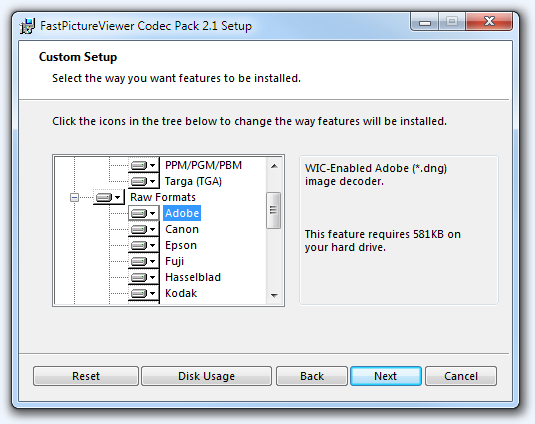 After restarting, the Windows operating system will begin displaying high quality miniature images instead of white, generic "document" icons, as pictured below on this web page. Additionally, Windows Vista and Windows 7 users will see their image's metadata displayed in Explorer's lower pane (which can be resized), and will be able to open images for larger viewing in Window's built-in photo viewers, as illustrated on this web page. System requirements: Disk space: Approximately 48MB of free disk space are required for a full 64-bit installation, or about 24MB on 32-bit systems. Other system requirements such as RAM, processor etc. are as per Windows requirements. Some of the codecs are multi-core enabled and take advantage of current computer's multi-processing abilities to improve performances during full-size raw decoding and embedded preview JPEG decompression. Operating systems: Windows 10, Windows 8.x, Windows 7, Windows Vista, or Windows XP with Service Pack 3 (SP3). All 32-bit and 64-bit editions are supported: the universal installer detects the OS details and automatically installs the appropriate versions and components depending on the computer it's deployed on. On Windows 8.x, support is provided for desktop applications. On 64-bit systems, both 64-bit and 32-bit versions of the codecs are deployed, as required by Microsoft in their codec developer's guidelines, as such, all 64-bit and 32-bit codec-enabled applications are supported on x64. Our codecs are read-only and follow Microsoft recommendations for codec development regarding threading model and deployment: they conform to the the Windows 7 requirements. Server operating systems such as Windows Server 2008 and Windows Server 2008 R2 are also supported. On Windows XP, thumbnail views are enabled in Windows Explorer for all supported image formats through our own 64-bit and 32-bits "thumbnail providers" (which also enable JPEG-XR / HD Photo thumbnails), but users need to install separate applications for large-size viewing, as the built-in Windows Picture and Fax Viewer (and Windows XP Explorer's thumbnail strip preview pane) were never designed to be extensible by the way of installable codecs. Processor requirements:
The FastPictureViewer Codec Pack is optimized for the latest microprocessors (such as for example the Intel Core i7-9xx series) and automatically takes advantage of multiple processors, multiple processor cores and Intel Hyper-Threading technology, where available, for better performance on modern computers. This product should work fine on compatible non-Intel processors, provided they support the minimum requirements outlined above (the level of optimizations may vary). Windows Explorer Settings (Windows Vista and Windows 7): After restarting the computer, you may have to enable "Large icons" or "Extra large icons" views using Explorer's context-menu (right-click in an unused area within an Explorer file pane to display the menu): 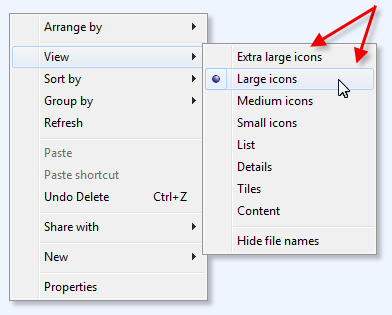 If thumbnails are not showing, make sure that the icons option is not checked in Explorer's Folder Options: 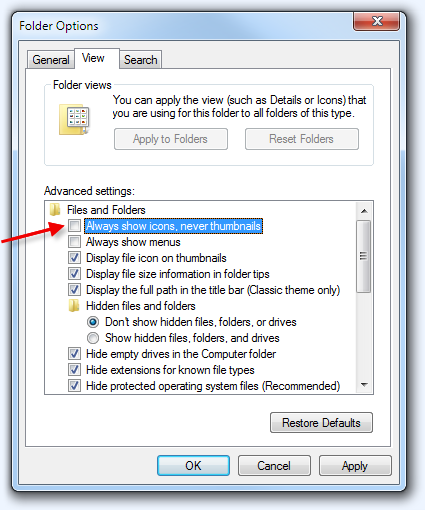 Also verify that your computer's Performance Options are set for best appearance: 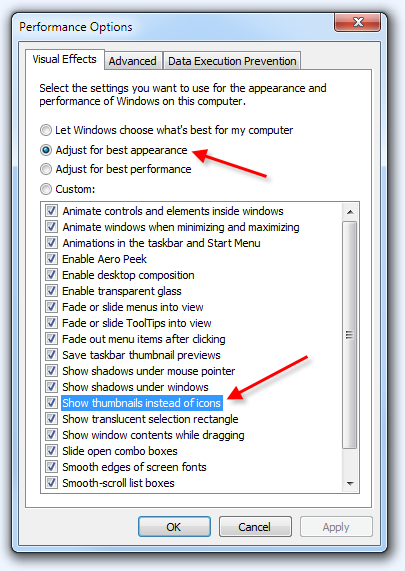
(The appearance options can be opened by typing Adjust the appearance of Windows in the Start menu search box.) Last, but not least, if thumbnails are not showing and Windows displays a little "security lock" icon instead, make sure to take ownership of the files in question, or ask the file's owner to give you access to them: 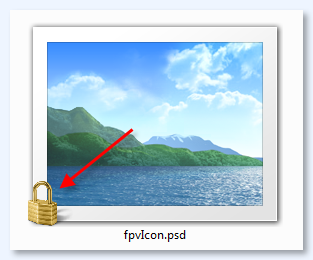
TIP: The height of the bottom pane displaying file information and metadata on Windows 7 and Vista can be adjusted to show more or less metadata items: just click and drag the top edge of the bottom pane with the mouse. How to rebuild thumbnails on Windows 7 and Vista: Windows 7 and Vista both use a central thumbnail store where miniature copies of all images are kept. Windows Explorer use this database to quickly retrieve thumbnails when browsing folders. After having installed the FastPictureViewer Codec Pack, your thumbnail database may need to be refreshed, for example to take advantage of the automatic rotation of JPEG files where new thumbnails needs to be created. To clear the thumbnail database, use the built-in Disk Cleanup utility, which can be started by clicking the Start menu and typing Disk Cleanup in the search box, then pressing the Enter key. Select drive C: when asked, then make sure the Thumbnails option is checked in the list of items to cleanup, then press the OK button. Once the cleanup process is complete, please logout from your Windows session (or restart the computer) to complete the cleanup task. 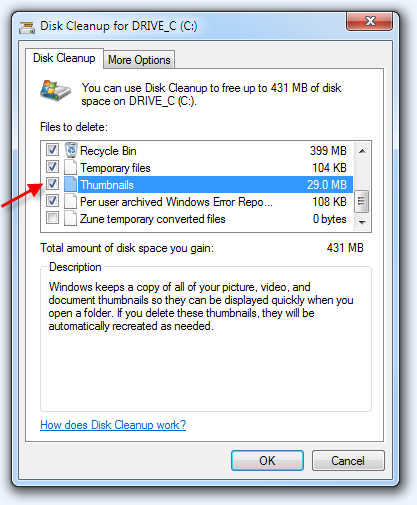
Windows Explorer Settings (Windows XP SP3): On Windows XP, one may need to set the current viewing mode to "Thumbnail views" from Explorer's toolbar (or View menu) to enable thumbnails in Explorer views: 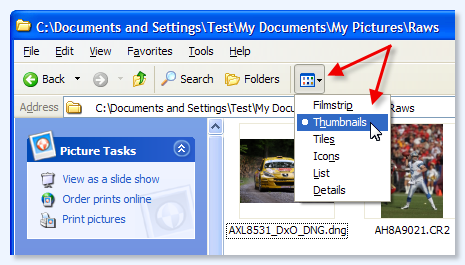 Control Panel: The FastPictureViewer Codec Pack ships with a Control Panel applet that let advanced users configure some aspects of the codec's operations. The tool allows to configure certain codecs to force them to always use the embedded JPEG preview image, and never decode the raw data from scratch. Using the JPEG preview is appropriate in most cases for Explorer thumbnails and quick previews in Windows Photo Viewer, moreover the preview image typically reflects all camera settings such as white balance, sharpening, contrast, picture controls and usually looks better than the "as shot" basic raw conversion performed otherwise. Our raw codecs also operate much quicker for large size viewing in Windows Photo Viewer or Photo Gallery when using the JPEG data instead of the raw data as a basis to create the images. Some of our codecs (DNG, NEF, CR2...) ship with the JPEG option enabled by default, but you can use the supplied control panel configuration applet to change this behavior in a few clicks. Support: In case you run into any issue while downloading or installing the FastPictureViewer Codec Pack, please let us know by writing to support {at} fastpictureviewer {dot} com. We'll do our best to help you ASAP. Licensing: The FastPictureViewer Codec Pack is licensed on a per-user basis and the license terms allows for installation of the software on multiple computers belonging and used by the same user. Site licenses, with substantial quantity discounts starting from 3 users, are available directly from this page for up to 100 users. Please contact us for server licensing (for example to use the codecs in an ASP.NET 3.x / 4.x server application), redistribution (if you are an application developer), or for large corporate deployments beyond 100 users per site, we have quotes ready for up to 1000-users licenses.
What happened to the free version? |
Before you forget: follow us
on Twitter, bookmark this page on your favorite
social bookmarking service and share your experience
on your blog or website, and within online
communities you participate with. A little
word-of-mouth can go a long way to help us keep
our price so incredibly low.
News
| Fri Aug 20, 2010: | We finalized our first Fortune 500 corporate deal for the FastPictureViewer Codec Pack: Electronic Arts Inc., from Redwood City, CA, USA - the world's largest game software publishing company - acquired a site license covering all the CG workstations of their largest development studio in Burnaby, British Columbia! We got the purchase order today, thanks Colin and Claude for making this happen! |
| Sat Aug 21, 2010: | FastPictureViewer Codec Pack 2.3 is available, with a distinctive new feature
for Windows 7 and Windows Vista users: automatic,
on-the-fly JPEG
files rotation, based on orientation
data written by compatible digital
cameras. The files are left intact on disk: our JPEG codec rotates the images, as needed, when images gets loaded by compatible applications. JPEG thumbnails and previews in Windows Explorer, Photo Gallery, Photo Viewer and Media Center 7 and Media Player 12 are shown in the correct orientation, and we even managed to improve performance over the standard Windows JPEG decoder, speeding up JPEG viewing throughout in Windows Explorer and Windows' built-in image viewers about 25%. Overall raw preview JPEG decoding performance was also improved markedly across all major raw formats codecs in this release, in particular when running on dual-processor or multicore computers. |
| Tue Aug 24, 2010: | A new Radiance HDR codec was added to the FastPictureViewer Codec Pack ! The new codec enable support for the HDR format, popular in the Computer Graphics industry, and preserves the full dynamic range of the images by returning true 32 bit RGBE pixels. |
| Thu Aug 26, 2010: | FastPictureViewer Codec Pack 2.3 R5 improves compatibility of the newly introduced JPEG auto-rotation feature and brings additional performance improvements. Full-size JPEG viewing in Windows Photo Viewer, Windows Photo Gallery and Windows Media Center 7 is now up to 30% faster, compared to the stock JPEG decoder on Windows 7. |
| Thu Aug 26, 2010: | Orbit Studio from Copenhagen, Denmark, joined the ranks of our corporate customers. |
| Fri Aug 27, 2010: | Today we supplied a small site license to the Canadian offices of Avid Technology, Inc, a world leader in the digital audio/video sector. |
| Mon Sep 13, 2010: | FastPictureViewer Codec Pack 2.4 was released, with improved performance in the OpenEXR codec for Zip-compressed images and an all-new Adobe Photoshop PSD and Adobe PhotoDeluxe PDD codec, supporting files saved in Maximum Compatibility mode, as well as providing simple layer blending for images saved without the compatibility option. The codec exposes EXIF and XMP metadata, if present in the files, as well as color profile information enabling color-managed display of PSD and PDD files in Windows Explorer and other color-managed codec-enabled applications, including our own FastPictureViewer Professional 1.2.165 standalone image viewer. |
| Fri Sep 17, 2010: | Today we welcome Hidden Path Entertainment, Inc., of Bellevue, WA, USA - a leading Xbox, PC and Mac game publisher, author of the award-winning Defense Grid game - among the growing ranks of our corporate customers. Thanks Jeff! |
| Mon Oct 11, 2010: | Blizzard Entertainment from Irvine, CA, USA, publishers of the renowned StarCraft and World of WarCraft games, purchased a FastPictureViewer Codec Pack site license. Thanks! |
| Thu Oct 14, 2010: | Electronic Arts from Redwood City, CA, USA purchased another FastPictureViewer Codec Pack site license for The SIMS team. Thanks! |
| Thu Oct 14, 2010: | The FastPictureViewer Codec Pack 2.5 was released with updated Nikon NEF and Canon CR2 codecs, enabling color managed previews in Windows Explorer and Windows Photo Viewer (Vista and later), by exposing color profile data for raw CR2 and NEF files shot with the camera set to Adobe RGB. |
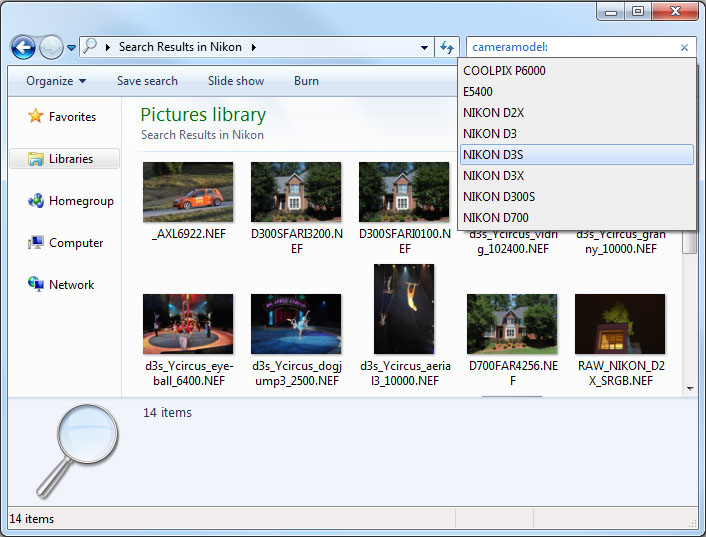
| Sat Nov 06, 2010: | The FastPictureViewer Codec Pack 2.5 R2 is a performance update featuring even faster JPEG unpacking for unmatched raw preview speed in codec-enabled applications and multi-processor computers. This version also features an important fix that corrects an issue that prevented Windows Search to properly index image metadata in some cases, despite the data being displayed properly in Explorer. Some raw codecs and the Photoshop PSD codec also expose additional metadata elements to Windows Explorer (on Vista and later), such as the software version, exposure program, focal length, flash mode and more, where applicable. You can now use Windows Search's Advanced Query Syntax (try for example to type datetaken: in an Explorer search prompt) to locate any image by metadata directly from Explorer's search boxes on Vista or later. |
| Thu Nov 11, 2010: | The FastPictureViewer Codec Pack 2.5 R3 adds support for several new cameras, including the Nikon D7000, D3100 and Coolpix P7000, Canon EOS 60D, PowerShot G12, Hasselblad HD4, Panasonic FZ40, FZ100 and LX5, Pentax K-r, K-5 and 640D, Samsung GX20 and WB2000 as well as Sony A33 and A55V. |
| Sat Dec 11, 2010: | FastPictureViewer Codec Pack 2.5 R4 is a small maintenance update fixing an issue with the Photoshop PSD codec (related to 32-bit gray scale images) as well as a crash occurring in a very specific scenario. |
| Tue Dec 14, 2010: | FastPictureViewer Codec Pack 2.5 R5 rolls back some recent changes that caused intermittent stability issues when processing some image types on multiprocessor computers. |
| Thu Feb 10, 2011: | FastPictureViewer Codec Pack 2.5 R6 is a camera compatibility update adding support for several new models (Canon S95, Panasonic GF2, GH2, Samsung NX100, Sony A-580). |
| Wed Mar 23, 2011: | Version 3.0 (3.0.0.20) was released today with thumbnail support for Adobe InDesign (*.INDD), Adobe Illustrator (*.AI) as well as Encapsulated PostScript (*.EPS) and Portable Document Format (*.PDF) provided that those files contains an embedded XMP packet with a ready-made preview thumbnail. EPS files containing a TIFF preview, such as those saved by Adobe Illustrator 8 or later, are also supported. XMP and IPTC4XMP metadata, if present, is exposed to Windows Explorer for display and to Windows Search for indexing. |
| Sat Apr 02, 2011: | Version 3.0 was refreshed to v3.0.0.24 with support for Canon EOS 600D, Canon Digital Rebel T3i, Canon Kiss Digital X5, Canon EOS 1100D, Canon Digital Rebel T3, Canon Kiss Digital X50, Sony DSLR-A390 and Fuji FinePix X100 digital cameras. |
| Wed Apr 13, 2011: | Version 3.0 was refreshed to v3.0.0.25. The only change is an improvement in memory efficiency in our Adobe Photoshop PSD codec, which helps performance when decoding huge (1GB+) Photoshop PSD files on memory-starved computers. |
| Sun Apr 24, 2011: | Version 3.0 was refreshed to v3.0.0.26 to correct an issue which prevented correct detection of some very old Olympus raw files. |
| Wed Apr 27, 2011: | Version 3.0 was refreshed to v3.0.0.27 to better support non-standard (hacked) thumbnail sizes in Windows XP Explorer. For performance reasons, we don't recommend the use of non-standard thumbnail dimensions larger than 160 pixels on Windows XP. |
| Thu May 12, 2011: | Version 3.0 was refreshed to v3.0.0.29 with support for Nikon D5100, Sony DSLR-A230 and A290, Olympus E-PL1s and XZ-1, Fuji FinePix F550EXR and HS20EXR as well as Kodak EasyShare Z990. |
| Thu May 12, 2011: | Today we welcome Sony Online Entertainment, acquirer of a FastPictureViewer Codec Pack Site License, among our distinguished corporate customers. |
| Mon May 16, 2011: | Version 3.0 was refreshed to v3.0.0.30 with an enhanced DirectX DDS codec, now supporting the ATI 3Dc (ATI2N) compression format. |
| Mon May 23, 2011: | Version 3.0 was refreshed to v3.0.0.31 with a small update to our JPEG decoder regarding CMYK JPEG files handling by our own FastPictureViewer Professional image viewer, occurring on old Windows versions (Windows XP and pre-platform update Windows Vista and Windows Server 2008). Users of the Codec Pack alone don't need to install this update. |
| Mon Jun 20, 2011: |
Version 3.1 (3.1.0.33) was released, featuring three
brand new codecs: Softimage PIC, Silicon Graphics RGB and Autodesk Maya IFF, as well as a cure for an issue some users have been experiencing
for some time when viewing deleted images
in the Recycle Bin or stored on DVD, Blu-Ray and CD medias.
Users of Windows XP will also find a new option in the Codec Pack Control Panel applet, letting them control the thumbnail's background shown in Windows XP Explorer thumbnail views: users can now choose between black, light gray, dark gray, white and checkered background, to be used underneath thumbnails in XP Explorer thumbnail views for image formats supporting alpha-transparency and whose support is provided by one of our codecs, such as DirectX DDS, Truevision TGA, or the new Autodesk Maya IFF, Silicon Graphics RGB and Softimage PIC codecs. Windows Vista and later natively supports thumbnail transparency and the background color in Explorer thumbnail views is white. |
| Tue Jun 21, 2011: |
Version 3.1 was refreshed to 3.1.0.34 with some fixes to the Maya IFF
codec (regarding mixed
compressed/uncompressed files) and Silicon Graphics SGI RGB codecs
(for 4 channels files, also fixes a small
memory leak and adds some level of parallel
decoding). All codecs have been rebuilt, as an extra precaution, after we applied the changes recommended in Microsoft security bulletin MS11-025 (KB2538241 and KB2542054). |
| Thu Jun 30, 2011: | Version 3.1 was refreshed to 3.1.0.36 with support for FUJI FinePix REAL 3D W1 and W3 stereo cameras (MPO files, displayed as 2D previews), as well as some minor fixes related to invalid or corrupt files handling for some formats. Our fast JPEG decoder also benefits from additional performance enhancements over previous versions when running on Intel® Atom CPU, as well as processors supporting the Intel® AVX 256 bit instruction set. |
| Fri Jul 8, 2011: | Version 3.1 was refreshed to 3.1.0.40 with small compatibility updates and fixes in the Truevision Targa, Silicon Graphics RGB, Radiance HDR and Softimage PIC codecs, providing better support for files created by some less rigorous 3rd party applications. |
| Mon Jul 25, 2011: | Version 3.1 was refreshed to 3.1.0.41 with support for seven new cameras: Olympus PEN E-P3, Leica D-LUX 5 and V-LUX 2, Panasonic DMC-G3 and DMC-GF3, Sony NEX-C3 and SLT-A35. Up-to-date and timely! |
| Tue Jul 26, 2011: | Microsoft releases its Camera Codec Pack supporting 120 old cameras, pretends it's something new. |
| Thu Jul 28, 2011: | Version 3.1 was refreshed to 3.1.0.42 with improved detection and support of rebranded camera models producing slightly different files due to firmware differences, increases the number of supported camera models to 379. |
| Mon Aug 01, 2011: | Version 3.1 was refreshed to 3.1.0.43 with a new codec supporting the VTF format (Valve Texture Format), as well as some additional raw previewing performance tweaks aimed at Windows Photo Viewer and Windows Photo Gallery. Minor update to our experimental Photoshop import plug-in optional download. |
| Sat Aug 13, 2011: | Version 3.1 was refreshed to 3.1.0.44 with support for 8 and 16 bit gray scale linear DNG files created by scanner software such as Hamrick Software's VueScan. |
| Tue Aug 23, 2011: | A freely downloadable 15-days Trial Edition of the FastPictureViewer Codec Pack has been made available. |
| Fri Oct 07, 2011: | Version 3.1 was refreshed to 3.1.0.46 with support for eight new cameras: Fuji FinePix F600EXR, Nikon Coolpix P7100, Olympus E-PL3 and E-PM1, Panasonic DMC-FZ150, Sony NEX-5N, SLT-A65 and SLT-A77, raising the total number of supported models to 387. |
| Wed Oct 26, 2011: | Version 3.1 was refreshed to 3.1.0.47 to fix an issue where the registration data was removed unduly when the installation got repaired, ending the trial period too soon or unregistering the product. This small fix avoids the need to uninstall/reinstall the product. |
| Wed Dec 21, 2011: | Version 3.1 was refreshed to 3.1.0.48 with support for seven new cameras: Canon PowerShot S100, Fuji X10, Nikon 1 J1, Nikon 1 V1, Panasonic DMC-GX1, Leica V-LUX 3 and Samsung NX200. Support for XMP-based PDF thumbnails is now a separate option which can be opted-out during setup (to avoid conflicts with Adobe Acrobat own PDF thumbnail provider if installed). The FastPictureViewer Codec Pack installer now remembers previous feature customizations across upgrades. |
| Fri Jan 06, 2012: | Version 3.1 was refreshed to 3.1.0.49 to fix a bug in the JPEG decoder occurring with rare files using the (rather uncommon and low-quality) 4:1:1 chroma subsampling. Oddly enough, this format variant suddenly became more popular this morning when someone at Nikon had the strange idea to publish one of the (edited) Nikon D4 samples using it (the full res airborne red/blue wrestlers picture). |
| Mon Jan 09, 2012: | Version 3.1 was refreshed to 3.1.0.50 to work around a JPEG color space issue caused by inconsistent EXIF color space information found in some files (typically out-of-camera JPEG files shot in Adobe RGB mode then converted to the sRGB color space by applications failing to keep metadata in sync with the actual data). |
| Sat Jan 14, 2012: | Version 3.1 was refreshed to 3.1.0.51 to resolve occasional license activation issues encountered in some corporate networking environments. |
| Wed Jan 18, 2012: | Version 3.1 was refreshed to 3.1.0.52 to work around a crash induced by one of the new features introduced by Adobe in the (yet unpublished) next specification of its proprietary DNG format. The upcoming "fast load" and "lossy" DNGs variants are undocumented to this day and are ignored by our present codec. |
| Tue Jan 24, 2012: | Version 3.1 was refreshed to 3.1.0.53 to fix a regression bug related to 4-channels CMYK JPEG files. |
| Tue Feb 21, 2012: | Version 3.1 was refreshed to 3.1.0.54 to fix a regression bug introduced in 3.1.0.52 and affecting some Sigma X3F files. A bug was fixed in the XMP-based PDF thumbnail provider component registration. A bug was fixed in the Maya IFF codec where one of the many supported variants, uncompressed RGBA8, was decoded incorrectly. |
| Wed Mar 28, 2012: | Version 3.2 (3.2.0.55) was released, with thumbnail support for Google SketchUp documents (SKP) as well as SketchUp material files (SKM). The JPEG 2000 codec was enhanced and supports a few additional JPEG 2000 format variants. The fast JPEG decoder got a bug fix related to some odd-sized CMYK files, finally the EXR, PSD and JPEG codecs got some speed improvements. |
| Fri Apr 06, 2012: | Version 3.2 was refreshed to 3.2.0.56 to fix a small memory leak discovered in the auto-rotating JPEG codec. |
| Mon Apr 16, 2012: | Version 3.2.0.57 adds support for Computerinsel's PhotoLine thumbnails. |
| Fri Apr 20, 2012: | Version 3.2.0.58 fixes an issue in the JPEG2000 codec occurring under a specific usage scenario. |
| Sun Apr 29, 2012: | Version 3.2.0.59 fixes a small (and uncommon) issue affecting some codec-enabled applications performing their own auto-rotation, when auto-rotating JPEG files from some specific digital cameras. |
| Tue Jun 12, 2012: | Version 3.2.0.60 and 3.2.0.61 fixes another small (and uncommon) issue affecting the JPEG auto-rotation feature when applied to files from some specific digital cameras, and that were edited in a certain way. |
| Thu Jun 19, 2012: | Version 3.3 adds support for 20+ new cameras (Nikon D4, D800/D800E, D3200, Canon EOS-1D X, EOS 5D Mark III, PowerShot G1 X, Fuji HS30EXR, F770EXR, X-Pro1, X-S1, Olympus E-M5, Panasonic DMC-GF5, Sigma SD15, DP1, DP1S, DP1X, DP2, DP2S, DP2X, Sony NEX-F3, A37, A57) as well ad DNG support for files created by Adobe Lightroom 4.x with "fast load" and / or "lossy" options. This release also fixes small issues reported by customers. |
| Sun Jul 01, 2012: | Version 3.3.0.64 discontinues support for JPEG auto-rotation inside Microsoft Windows Live Photo Gallery, due to a number of issues encountered when enabling this feature inside this specific application. Raw and raster formats support provided to Windows Photo Gallery by the FastPictureViewer Codec Pack is unaffected by this change and, as a side note, the JPEG Auto-Rotation feature of the FPV Codec Pack is entirely optional and can be opted-out during setup without affecting any of the remaining functionality. |
| Sun Jul 01, 2012: | Version 3.3.0.65 is a raw compatibility update, adding support for three new cameras: Canon EOS 650D, Samsung NX20 and NX210, and Sigma SD1 digital cameras. |
| Sun Jul 01, 2012: | Version 3.3.0.66 is a raw compatibility update, adding support for two new cameras: Samsung NX1000, Sony DSC-RX100. |
| Thu Aug 09, 2012: | Version 3.3.0.67 improves raw decoding of Canon EOS-1D X CR2 files, reduces the memory footprint of the Photoshop PSD codec (uses less dynamic memory for decoding of some PSD files) and updates the OpenEXR codec - now built using the OpenEXR 1.7.1 library. The new OpenEXR codec implements support letting applications access the multi-resolution levels of tiled OpenEXR images through IWICBitmapSourceTransform, vastly minimizing the decoding memory footprint when the full resolution image is not needed or wanted. |
| Sun Aug 19, 2012: | Version 3.3.0.68 features an improved codec for the DirectX DDS format, adding support for several variants like BGR565, BGRA5551, 16bppGrayHalf, RGBA1010102 and RGBA1010102XR, 32bppRGBE, 1bppBW and couple of others. Our DirectX DDS codec now reads more than 60 (!) DDS flavors. |
| Fri Aug 24, 2012: | Version 3.3.0.69 fixes a bug in the PSD codec which prevented our FastPictureViewer image viewer to properly display some PSD files with embedded ICC profiles. |
| Mon Sep 04, 2012: | Version 3.3.0.70 is a minor maintenance release. |
| Wed Sep 19, 2012: | Version 3.3.0.71 is a Windows 8.x compatibility update. |
| Tue Nov 13, 2012: | Changed our code signing certificate from Comodo to VeriSign Class 3, re-signed all executable, codecs and installers for v3.3.0.72. |
| Fri Dec 21, 2013: | Today we welcome High 5 Games, of New York City, NY, USA, among our distinguished FastPictureViewer Codec Pack Site License customers. |
| Sun Dec 23, 2012: | Version 3.4 was released, adding support for 31 new cameras: Canon EOS 6D, EOS M, SX50 HS, S110, G15, Fuji FinePix F800EXR, X-E1, XF1, Leica D-LUX6, V-LUX4, Nikon D600, Nikon 1 J2, Nikon 1 V2, Coolpix P7700, Olympus E-PM2, E-PL5, XZ-2, Panasonic Lumix DMC-FZ200, DMC-G3, DMC-G5, DMC-LX7, Pentax K-5 II, K-5 II s, Samsung EX2F, NX210, Sigma DP1 Merill, Sigma DP2 Merill, Sony DSC-RX1, Alpha NEX-5R, NEX-6, SLT-A99V. |
| Tue Jan 1, 2013: | Version 3.4.0.75 fixes an issue in the Autodesk Maya IFF codec, which prevented files above a certain size to be recognized as valid. |
| Sun Feb 17, 2013: | Version 3.4.0.76 fixes a bug in the 32-bit OpenEXR codec which caused a crash under some particular circumstances. |
| Sun Mar 03, 2013: | Version 3.4.0.77 fixes a bug in Fuji RAF full decoding, which failed for some camera models like the S3Pro. This release also fixes some potential security issues and has been internally reviewed and rebuilt with the latest Microsoft Security Development Lifecycle guidance in mind. This version is now validated for use with the (highly recommended) Microsoft Platform Update for Windows 7 SP1 and Windows Server 2008 R2 SP1. |
| Mon Mar 04, 2013: |
Today we officially retired the Canon CHDK codec, a special codec that was handling raw files from some Canon pocket camera models owned by enthusiasts who hacked their camera's firmware to dump the raw sensor data and simulate a raw shooting mode that is normally not present on these models. While functioning as expected, due to the nature of those special raw files, this codec was likely to cause interferences with some applications and as such we did not install it by default. Users having this codec installed reported a number of issues in other applications lately, as well as incompatibilities with some recent Microsoft updates, so we took the decision to retire this component from the FastPictureViewer Codec Pack effective immediately. Raw files created from the following Canon PowerShot camera models, modified by their owners using the CHDK hacked firmware, are no longer supported: Canon PowerShot A460, A470, A530, A570, A590, A610, A620, A630, A640, A650, A710 IS, A720 IS, G7, S2 IS, S3 IS, S5 IS, SD300, SX20 IS, SX30 IS, SX110 IS, SX120 IS and SX220 HS. Support for JPEG files created by those models, as well as raw support for all other Canon models we handle is unaffected by this change. More information about the Canon CHDK hacked firmware can be found at http://chdk.wikia.com/wiki/CHDK |
| Tue Jun 11, 2013: | Version 3.5.0.78 is a recommended raw compatibility update and application compatibility update. |
| Thu Jun 27, 2013: | Version 3.5.0.79 is a bug fix release which resolves an unwanted interaction issue between our Targa (TGA) codec and Microsoft Office 2013. |
| Sat Jul 20, 2013: | Version 3.5.0.80 is a bug fix release which solves an ICC profile issue in our JPEG decoder which caused some JPEG files to be rendered as solid blue or otherwise incorrectly. |
| Sat Jul 27, 2013: | Version 3.5.0.81 is a bug fix release which solves a rare crash, only occurring with specially crafted 1 pixel JPEG files encoded in a certain way. |
| Thu Aug 01, 2013: | Version 3.5.0.82 is a bug fix release which solves an issue where some TIFF files created by Nikon Capture NX software (NEF files converted to TIFF) were misidentified. |
| Sat Aug 24, 2013: | Version 3.5.0.83 fixes an issue in our PSD codec, which now supports a couple more format variants that were previously ignored. This release also fixes an issue with some TIFF files created by onOne software, which were sometimes misidentified as raw files. |
| Sun Sep 15, 2013: | Version 3.5.0.85 fixes an instability issue in the 64-bit Photoshop PSD codec when used with PSD files without composite image and having multiple layers and/or effect layers. This is a recommended update. |
| Thu Sep 19, 2013: | Republished the installer. |
| Thu Oct 24, 2013: | Version 3.5.0.88 is a minor maintenance release: the Codec Pack has been rebuilt with updated tools (VS2013). FastPictureViewer Professional users must update the viewer together with this Codec Pack update, to version 1.9.326.0 or later. |
| Wed Jan 15, 2014: | Version 3.6.0.90 is a raw compatibility update. |
| Sun Apr 14, 2014: | Version 3.6.0.92 is bug fix release that corrects an issue occurring (only) with Sigma X3F files shot with the "Medium Resolution" camera setting. |
| Sat May 10, 2014: | Version 3.6.0.93 is a raw compatibility update. |
| Sun Sept 28, 2014: | Version 3.7.0.94 is a raw compatibility update. |
| Sun April 26, 2015: |
Version 3.8.0.96 is a raw compatibility update and also introduces the FastPictureViewer Codec Pack Import Plug-in for Adobe Photoshop® - Install the codec pack then copy the plug-in in Photoshop's Import-Export plugin's folder and start importing any of the raw files we support into most versions of Adobe Photoshop. The plug-in comes in handy when your current ACR version does not support your latest cameras: the FastPictureViewer Codec Pack Import Plug-in for Adobe Photoshop® helps fill the gap until your next Photoshop upgrade! |
| Sun April 23, 2017: | Version 3.8.0.97 is a technical update that addresses an issue that was reported by many customers where the Codec Pack gets unregistered when certain Windows 10 updates are applied, in particular major updates like the Windows 10 Anniversary Update or the Windows 10 Creator Update. From this version (and going forward) registering the Codec Pack should be permanent on Windows 10 just as it is on other versions of Windows!. |
The Codec Pack in action on Windows 7 64-bit (Explorer set to "Extra large icons" mode):
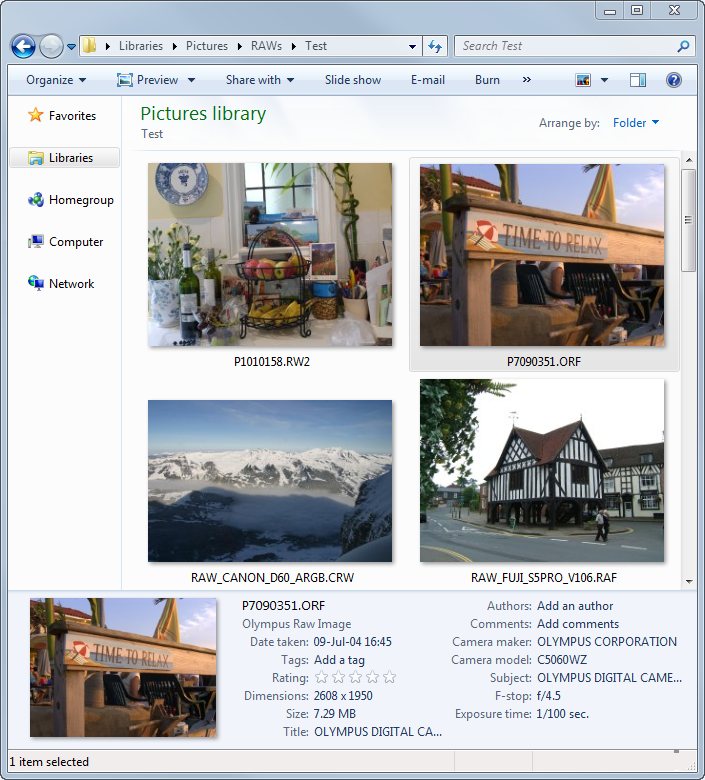
Credits:
http://raw.fotosite.pl (RW2),
Robert Wlodarczyk, (ORF),
http://www.rawsamples.ch (CRW, RAF)
Windows 7's built-in Photo Viewer learns new tricks (45+ additional file extensions supported in total):
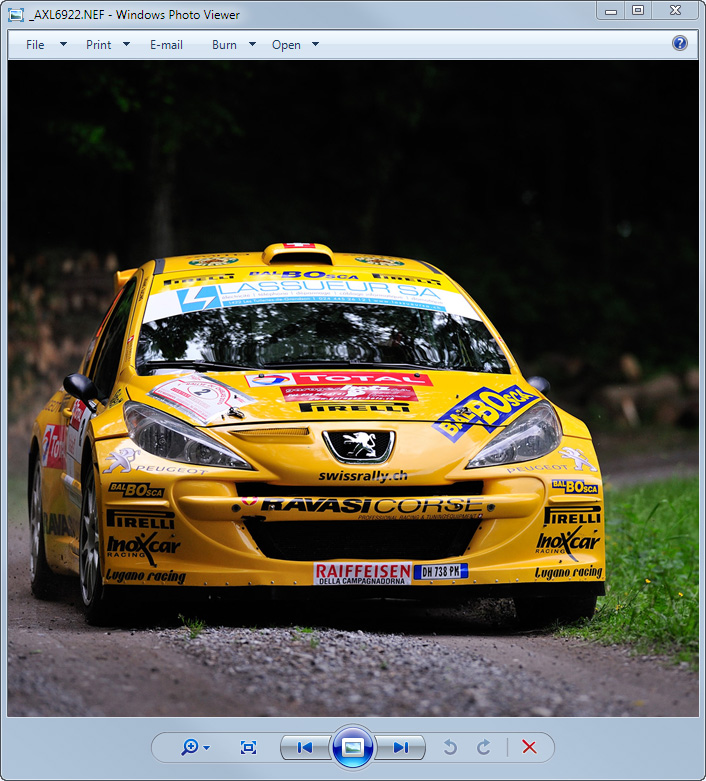
Fast previewing of NEF files from
embedded JPEG previews, reflecting all camera and
Capture NX settings. Photo credit:
A. Rietschin
Windows 7 Explorer Metadata Search Integration: find images by Tags, Date Taken, Author...
Thumbnails, Large size viewing and Slideshows in Windows 7 Media Center. Works with MC extenders too!
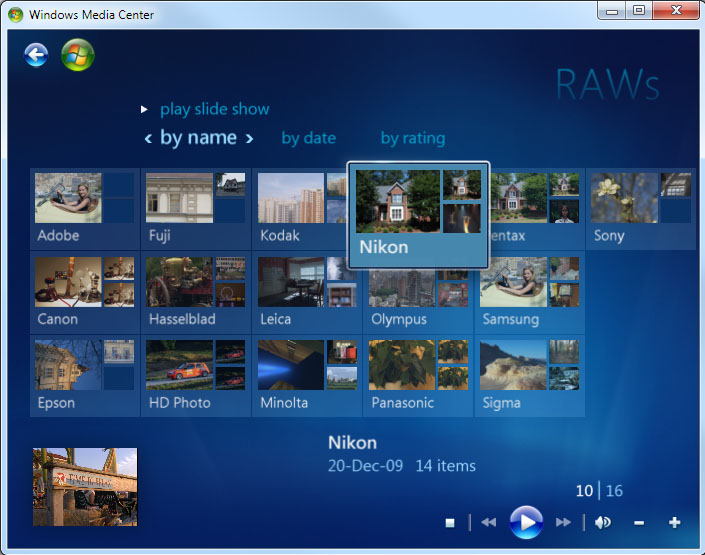
On Windows 7, the FastPictureViewer Codec Pack enables RAW support and automatic JPEG rotation straight into Windows Media Center! If you own a Media Center Extender, such as the XBox 360 and a wireless connection, you will be able to stream all your images, including RAW files, to your living room TV set.
CG and Gaming formats: OpenEXR, DirectX DDS, Targa TGA, PNM, JPEG2000, Radiance HDR, Photoshop PSD
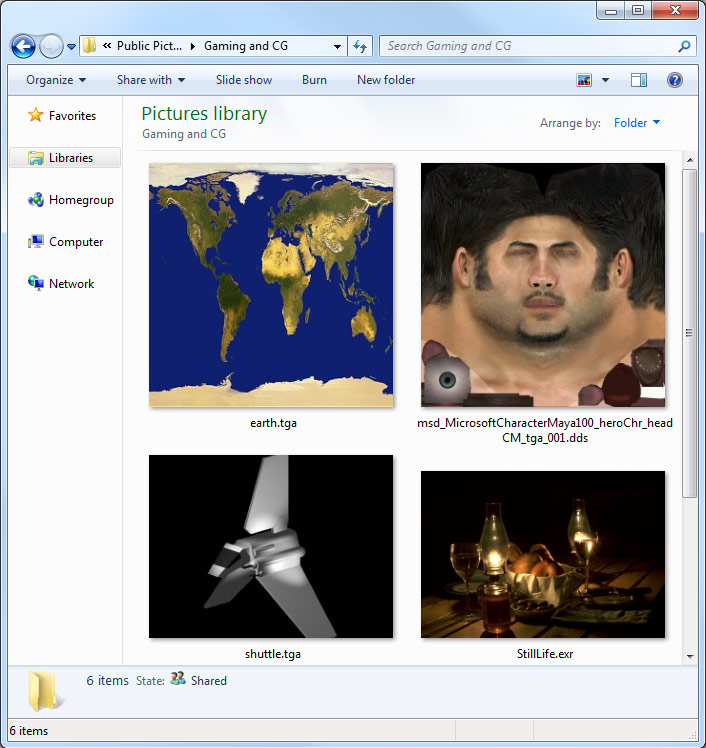
Our product is used by some of the largest game studios in the world, including Electronic Arts, Blizzard Entertainment and Hidden Path Entertainment.
Indicative list of image file formats currently supported by the FastPictureViewer Codec Pack 3.4
Raster Image Formats |
|||||||
|---|---|---|---|---|---|---|---|
| Extension(s) | Name | Auto rotate | Metadata | Remarks | |||
| *.dds | DirectX DDS | n/a | n/a | Our DirectX DDS codec supports uncompressed textures and several compression variants and pixel formats, including DXT1/3/5, YUV422 and R16G16B16A16 HALF, BGR565, BGRA5551, 16bppGrayHalf, RGBA1010102 and RGBA1010102XR 30-bit formats, 32bppRGBE, 1bppBW as well as ATI 3Dc texture compression formats (ATI1N, ATI2N, ATI2N_XY, ATI2N_DXT5). The codec currently reads all sample images supplied with the June 2010 DirectX SDK and all format variants written by Visual Studio 2012's picture editor, except BC6H and BC7 which are DirectX11-specific. As of today the DDS codec reads more than 60 format variants! | |||
| *.jpg, *.jpeg |
JPEG Auto-Rotation (exclusive feature!) |
Yes (Win7, Vista) |
Yes | Our JPEG codec adds automatic, on-the-fly rotation of images containing EXIF orientation information written in image files by compatible digital cameras. Please see your camera documentation to find out if it's equipped with an orientation sensor, and how to enable it. Our JPEG codec uses processor-specific optimizations and runs up to 30% quicker than the stock JPEG codec on Widows 7. The auto-rotation feature is not available on Windows XP. Microsoft Windows Live Photo Gallery users may want to opt-out this feature during setup, as it is know to create some conflicts with this particular application. | |||
| *.jp2, *.j2k | JPEG 2000 | n/a | n/a | Supports baseline 8bpc JPEG 2000 (8bpp Gray scale, 24bpp RGB) and S444 YCbCr. | |||
|
*.tga, *.tpic, *.vda,*.icb,*.vst |
Truevision Targa (TGA) | n/a | n/a | Supports uncompressed and RLE-encoded gray scale 8 and 16-bit, true color 15, 16, 24 and 32-bit (with alpha) and 8-bit indexed with 15, 16, 24 and 32-bit color maps. | |||
|
*.pnm, *.ppm, *.pgm,*.pbm |
Netpbm Portable Network Map |
n/a | n/a | Supports 1, 8 and 24bpp binary encoded files (P4/P5/P6) and 1 to 32 bit text encoded files (P1/P2/P3). Update: (Jul-13-2010) The PNM codec supports 16bpp big-endian binary gray scale and 48bpp big-endian binary RGB formats, along with 32bit/channel IEEE float extensions (32bit gray scale and 128bit ARGB). | |||
| *.exr |
Pixar / ILM OpenEXR |
n/a | n/a | Our OpenEXR codec produces highest quality 64bpp RGBA floating point data (16 bits per components, with Alpha) and support many variants of the EXR format, including tiled images and several compression schemes. The codec reads all sample images supplied by ILM with the OpenEXR SDK. The codec uses processor-specific optimizations to speedup unpacking of zip-compressed EXR files. The current version also supports multi-resolution files and can extract lower resolution mipmap levels directly, through the IWICBitmapSourceTransform interface. | |||
| *.hdr |
Radiance HDR |
n/a | n/a | Our Radiance HDR codec supports the 32-bit RLE RGBE format variant and returns 32bpp Red-Green-Blue-Exponent pixel data, preserving the full dynamic range of the images. | |||
| *.psd, *.pdd |
Adobe Photoshop PSD |
n/a | Yes, EXIF, XMP | Our Adobe Photoshop PSD and Adobe PhotoDeluxe PDD codec supports files saved with the Maximum Compatibility option, which contains a flattened preview image. The codec also attempts to perform simple layer blending for images saved without a pre-rendered preview and exposes EXIF and XMP metadata as well as ICC color profile information, enabling color-managed previewing of PSD/PDD files in Windows 7 and Vista. Our PSD Codec 2.5.0.11 should support most PSD format flavors including 1bit/pixel, indexed color, Grayscale, RGB, L*A*B, CMYK and Multichannel in 8 and 16-bit/channel variants, and 32-bit/channel RGB color and gray scale images. For files not containing a ready-to-use Maximum Compatibility preview, color rendition may vary a little and may not perfectly match Photoshop output for certain images, in particular in some color spaces, such as L*A*B or CMYK. | |||
| *.lrprev, *.noindex |
Adobe Lightroom Previews |
n/a | n/a | This codec if part of v2.4.0.3 and let users browse the Lightroom preview cache (*Previews.lrdata) directly from Windows Explorer. Windows 7 and Vista users can also open LR previews directly in Photo Viewer or Photo Gallery. The codec was tested with LR2 and LR3 preview files. | |||
| *.jps |
JPEG Stereo Image |
n/a | n/a | This codec if part of v2.5.0.1 and let users display 2D previews of NVIDIA 3DVision JPEG Stereo images, either as thumbnails in Explorer or in full-size in Windows Photo Gallery, Windows Photo Viewer and Media Center 7. Metadata editing is not supported. | |||
| *.mpo |
Multi-Picture Object |
n/a | n/a | This codec if part of v3.1.0.36 and let users display 2D previews of MPO files created by FUJI FinePix REAL 3D W1 and W3 stereo cameras, either as thumbnails in Explorer or in full-size in Windows Photo Gallery, Windows Photo Viewer and Media Center 7. Metadata editing is not supported. | |||
| *.pic |
Softimage PIC |
n/a | Limited | This codec was added in v3.1 and returns 32bpp BGR and 32bpp BGRA data (24bpp RGB + 8bit alpha). It supports uncompressed and RLE-encoded files. The codec simulates minimal EXIF information and exposes the file description, if present, through the standard ImageDescription tag (270). | |||
| *.iff, *.tdi |
Autodesk Maya IFF |
n/a | Limited | This codec was added in v3.1 supports 4-bytes-aligned (FOR4) files in the following formats: 8 and 16 bit gray-scale, 32bpp BGR and BGRA (24bit + 8bit alpha) files, as well as Z-Buffer-only files which are rendered as beautiful normalized 32bit IEEE floating point gray-scale images. It supports uncompressed and RLE-encoded files and decodes multiple tiles in parallel on multicore computers, making it particularly fast. The codec simulates minimal EXIF information and the Author, Comment, Software and Creation Date, when present, are surfaced through the appropriate EXIF fields and will be picked up by Windows Search. The 3.1.0.33 IFF codec does not support Amiga IFF files, this support may be added later. | |||
| *.sgi, *.rgb |
Silicon Graphics RGB |
n/a | Limited | This codec was added in v3.1 and supports 1, 2, 3 and 4 channels 8 and 16 bit per channel SGI files, with or without RLE compression. The codec use some level of parallelism while decoding files and runs quicker on multicore computers. It also simulates minimal EXIF information and exposes the file description, if present, through the standard ImageDescription tag (270). | |||
| *.vtf |
Valve Texture Format |
n/a | n/a | This codec was added in v3.1.0.43 and supports most common VTF variants. | |||
Raw Image Formats |
|||||||
| Extension(s) | Name | Auto rotate | Metadata | Remarks | |||
| *.dng | Adobe DNG Codec (Adobe Digital Negative), DNG 1.3 specifications, with fast thumbnail extraction from most DNG files and intelligent black borders removal. | Yes | Yes | Can be configured to skip raw conversion and always use embedded previews instead, using the provided Control Panel applet. Note that preview images can be of lower resolution than the real image. The DNG codec supports files created natively by DNG-enabled digital cameras, as well as files created with the Adobe DNG converter, with or without embedded raw original. Our DNG codec is much quicker than the current "r2" v1.1 preliminary codec available from Adobe labs and uses far less CPU resources to operate, in addition to be fully compatible with Windows Vista as well as installable on Windows XP, to provide high -quality thumbnails to all current Intel and AMD 32 bit and 64 bit desktop Windows versions and editions. | |||
| *.cr2, *.crw | Canon CR2 Codec, with fast thumbnail extraction from most CR2, CRW files and intelligent black borders removal. Also supports "Small RAW" (sRAW) modes offered by some Canon camera models. See below for the complete list of supported Canon cameras. | Yes | Yes | Can be configured to skip raw conversion and always use embedded previews instead, using the provided Control Panel applet. Note that Canon JPEG previews are usually of lower resolution than the real image, except on very latest cameras like the EOS 1D Mk IV whose files contains a full 16MP 1:1 preview. Color-managed previews in Windows Photo Viewer and Windows Explorer (Vista and later). | |||
| *.erf | Epson ERF Codec | Yes | Yes | ||||
| *.raf |
Fuji RAF Codec, with fast thumbnail extraction from most RAF files and intelligent "black borders" removal. |
Yes | Yes | ||||
| *.3pr, *.fff | Hasselblad 3PR/FFF Codec | Yes | Yes | ||||
| *.dcr, *.kdc | Kodak DCR/KDC Codec | Yes | Yes | ||||
| *.raw, *.rwl | Leica RAW/RWL Codec | Yes | Yes | ||||
| *.mef | Mamiya MEF Codec | n/n/a | Yes | Full (and relatively slow) raw decoding only. | |||
| *.mrw | Minolta MRW Codec | Yes | Yes | Can be configured to skip raw conversion and always use embedded previews instead, using the provided Control Panel applet. | |||
| *.nef, *.nrw | Nikon NEF Codec, with fast thumbnail extraction from most NEF and NRW files. See below for the complete list of supported Nikon camera models. | Yes | Yes | Can be configured to skip raw conversion and always use full-size embedded previews instead (shows Capture NX edits), using the provided Control Panel applet. Also supports previewing JPEG and TIFF files re-saved as NEFs from Nikon Capture NX software. Color-managed previews in Windows Photo Viewer and Windows Explorer (Vista and later). Limited support for NEF files created with Nikon Scan 4 software (thumbnails only). | |||
| *.orf | Olympus ORF Codec, wit fast thumbnail extraction from most ORF files, with intelligent "black borders" removal. | Yes | Yes | Can be configured to skip raw conversion and always use embedded previews instead, using the provided Control Panel applet. | |||
| *.rw2 | Panasonic RW2 Codec | Yes | Yes (*) | Can be configured to skip raw conversion and always use embedded previews instead, using the provided Control Panel applet. (*) The ISO speed is stored outside of the standard EXIF segment in RW2 files, as such Windows Explorer is unable to display this specific metadata item. | |||
| *.pef | Pentax PEF Codec, with fast thumbnail extraction from most PEF files, with intelligent "black borders" removal. | Yes | Yes | Can be configured to skip raw conversion and always use embedded previews instead, using the provided Control Panel applet. | |||
| *.x3f | Sigma Raw Image | Yes | Yes | JPEG Preview only | |||
| *.srw | Samsung SRW Codec | Yes | Yes | Can be configured to skip raw conversion and always use embedded previews instead, using the provided Control Panel applet. | |||
| *.cs1 | Sinar CS1 Codec | n/a | No | Full (and relatively slow) raw decoding only. Sinar CaptureShop 1 raw images. | |||
| *.arw, *.sr2, *.srf | Sony SR2 Codec | Yes | Yes | Can be configured to skip raw conversion and always use embedded previews instead, using the provided Control Panel applet. | |||
Additional Features and Extras |
|||||||
| Extension(s) | Name | Remarks | |||||
|
Google SketchUp Document (*.SKP) Google SketchUp Material (*.SKM) |
Thumbnail Provider | Our Google SketchUp Thumbnail Provider enables thumbnail extraction from Google's SketchUp document and material files for all supported platforms, including 64 bit operating systems. | |||||
|
PhotoLine Document (*.PLD) |
Thumbnail Provider | Our Computerinsel PhotoLine Thumbnail Provider enables thumbnail extraction from PhotoLine documents for all supported platforms, including 64 bit operating systems. | |||||
|
Adobe InDesign (*.INDD) Adobe Illustrator (*.AI) Encapsulated PostScript (*.EPS) Portable Document Format (*.PDF) |
XMP-Based Thumbnail Provider | The XMP-based thumbnail provider enables thumbnail and XMP/IPTC metadata extraction from INDD, AI, EPS and PDF files saved by recent Adobe software. The thumbnail provider looks for an XMP packet within the files and extracts the preview thumbnail and metadata: any XMP and IPTC4XMP metadata present in the files is surfaced to Windows Explorer and indexed by Windows Search, enabling users to locate files by keywords/tags, author, title etc., from any Explorer search prompt in Windows Vista or later. The thumbnail provider also supports TIFF previews that may be present in EPS files, such as those created by Adobe Illustrator 8 or later. The XMP-based thumbnail provider is a lightweight component that extracts elements that must already be present in the files. Files written by current Adobe software all contain suitable thumbnail or preview data, as well as metadata in XMP format and are thus compatible with our XMP-based thumbnail provider. Old files and files created with non-Adobe software may need to be resaved with newer software in order to contain the necessary thumbnail and XMP metadata. | |||||
|
Rawzor (*.rwz) for CR2, NEF, NRW, PEF, ORF |
Rawzor Compressed Format Previewer (*.rwz) |
PProvides previewing support for some of the Rawzor compressed RAW formats. Rawzor is a promizing special-purpose compression utility that compresses raw files from many cameras into its own, smaller format. The Rawzor previewer included in this pack allows RWZ file previewing and metadata extraction without prior decompression, enabling Explorer to handle Rawzor files as any other raw format supported by our product. | |||||
| All formats |
Thumbnail Provider for Windows XP |
Provides support for thumbnail views in Windows XP Explorer (SP3), for all the above formats, plus HD Photo / JPEG XR files. Also works with Windows XP 64 SP2 and Windows Server 2003 x64, provided that WIC 64 is installed on the computer. Fast thumbnail extraction from most CR2, CRW, NEF, NRW, PEF, RAF, ORF and DNG files, with intelligent black borders removal. | |||||
| All formats |
32/64-bit
WIC Import Plug-In for Adobe Photoshop CS3/CS4/CS5 |
Allows Adobe Photoshop CS3/CS4/CS5 to directly import images using any codec part of the FastPictureViewer Codec Pack. This plug-in is available as a small separate download (click to get the file) and comes as a couple of naked .8ba file that must be installed manually in the appropriate place on your computer (the Photoshop "Plug-ins\Import-Export" folder). This package contains both 32 and 64-bit versions of the plug-in, along with succinct installation instructions. Once installed, the plug-in appears in Photoshop's File->Import menu and let you import any supported file types directly, in 24bpp RGB. This optional add-in is available 'as-is' and is not yet part of the FastPictureViewer Codec Pack. | |||||
| All formats | Windows 7 Slideshow Gadget | Windows Slideshow gadget, modified to support RAW formats. The gadget is available as a separate download. Unzip the file to "C:\Program Files\Windows Sidebar\Shared Gadgets\". This optional add-on is available 'as-is' and is not part of the FastPictureViewer Codec Pack. | |||||
Links to related 3rd Party Add-Ins and Utilities |
|||||||
| Extension(s) | Name | Remarks | |||||
| Some, see author's site. | Paint.NET Plug-in (aka "RAWLOAD") | Let Paint.NET users import raw images through some of the codecs from this pack. Currently in testing, see this post in Paint.NET's user forum for more information. | |||||
Some WIC Codec enabled applications (benefits from the FastPictureViewer Codec Pack): |
|||||||
| Name | Remarks | ||||||
| FastPictureViewer Professional | Our own photographer-oriented image viewer, designed for photographers (try it!). | ||||||
| Windows Explorer | Native codec support starting from Windows Vista, or Windows XP SP3 with the help of our own Thumbnail Provider. | ||||||
| Windows Photo Viewer | Default image viewer on Windows 7. | ||||||
| Windows Media Center 6.1 | Media and entertainment center on Windows 7 Home Premium, Professional and Ultimate. | ||||||
| Windows Photo Gallery | Default image viewer on Windows Vista. | ||||||
| Windows Live™ Photo Gallery | Excellent image organizer, part of Windows Live™. Available for download from the Microsoft website. | ||||||
| Microsoft Image Composite Editor | Advanced panoramic image stitcher with native support for 64-bit operating systems. | ||||||
| Sony Vegas Pro 9 and later | Sony's top-of-the-line professional nonlinear video editing suite: drop EXR (and other) files straight to Vegas tracks. | ||||||
| VSO Photo Gallery | An upcoming photo organizer from VSO Software. | ||||||
| Easy Photo Uploader for Facebook | An image upload application for Facebook, from Obvious Idea. | ||||||
| IMatch | An image management suite from Mario M. Westphal (support for WIC Codecs must be enabled in the options). | ||||||
| iView MediaPro / Expression Media | Digital Asset Manager from iView Multimedia | ||||||
| RSpec | Real-time spectroscopy software from RSpec-Astro.com | ||||||
| Paint.NET | A nice and free image editor (codecs supported through the Paint.NET add-in described above). | ||||||
| The Panorama Factory | Image stitcher/panorama maker with WIC codec and 64-bit support, from panoramafactory.com | ||||||
| Adobe Photoshop CS3, CS4, CS5 | The most complete image editor from Adobe Inc. (codecs supported through our experimental Photoshop import plug-in described in the above section: Adobe Photoshop does not support Windows-compatible image decoders on its own). | ||||||
| PhotoLine 16.53 | A photo editor from Computerinsel GmbH (www.pl32.com) | ||||||
| Ingestamatic for Windows 7 | A image import / geotagging automation tool from Marc Rochkind (www.imageingester.com) | ||||||
What happened to the free version?
To make a long story short, it did not work. Web traffic did surge and people did love the codecs, but after 106,661 downloads from our server (and 117,738 hits on the post-install web page), only about 0.2% of the downloaders actually donated anything: one fifth of a percent of all users is a disappointing figure at best.
Pragmatically, we'd have been happy with 90 or even 95% free riders, but 99.8% was a bit too much (that's two donations every 1,000 installs!) so we decided to pull out the free version and to move to another model, with an extra-extra-low introductory price to ease the transition (but not before putting several more weeks of additional effort to introduce five entirely new codecs for version 2.0).
It was an interesting experiment and we learned a few things along the way, but it was not economically viable considering the time and effort that we put behind this product, for example we were first on the planet to support the Canon EOS 1D Mk IV, we also are the *only* supplier of 64-bit codecs for a number of formats: a similar codec pack is simply not available elsewhere, at any price.
A big THANK YOU to those who donated, though, it was very much appreciated! We'll gladly send the 2.0 version to those who contributed an amount equivalent or higher than the current selling price, just write and we'll take care of it.
Possible future formats
Will this mess up my images?
Will this wreak havoc with my computer?
Any bundled adware, spyware, malware, toolbarware, whatever-ware?
Can I use raw files as desktop background or in slideshows?
Custom codec development
Developer's corner
There is no "OCX" or "DLL" that can be used to access the codecs from older development environments (but nothing prevents someone from writing one and wrap WIC to make it callable from almost any environments). Any application developer can use the WIC imaging framework, which is part of Windows since 2006 and documented on MSDN, to access images through our codecs or any others. Application using WIC automatically benefits from installed codec(s) and gains instant access to new image formats without any modification or recompilation, once new codecs are installed on the end-user machine. WIC is available to native application developers as well as .NET application developers using the .NET Framework 3.0 or higher. The FastPictureViewer Codec Pack codecs are compliant WIC decoders and can be used from any WIC host, past, present and future.
If you are a software publisher selling a WIC-enabled product and want to resell the FastPictureViewer Codec Pack, become an affiliate through Avangate and start offering this product on your own website. Of course you'll get a commission on every sale made through your channel.
(Geek Note: WIC is COM based and can be programmed from many languages and development environments able to instantiate COM classes and use COM custom interfaces, moreover, .NET and ASP.NET 3.x, 4.0 (or later) and WPF 3/4 developers using the System.Windows.Media.Imaging namespace for image access automatically benefits from installed codecs, as .NET 3 and WPF secretly uses WIC under the hood (so does GDI+ apps on Windows 7, but for some reason Microsoft did not enable external codec support in this scenario). That means that all existing .NET 3.x and WPF-based applications, as well as WIC-enabled native applications, benefit from the FastPictureViewer Codec Pack and gain the ability to open new image formats: the codecs provide much broader benefits than usual raw-enabled viewers or XP-era thumbnail providers. On a more technical note, all our codecs are free-threaded (which is a requirement for Windows 7) and many of them are also multi-core aware: they provide speed benefits beyond what's offered in most other raw viewing products on the market for full image decoding on modern computers, including competing codec offerings and manufacturer-provided codecs, when they exists.... Finally, unlike most camera manufacturer's codecs, they can also be used from within Windows Services or in server applications as they never, ever pop up modal dialogs (or any UI whatsoever) like some manufacturer's codecs do. The easiest route to raw-enable and EXIF-enable your ASP.NET 3.x or 4.0 server app is by the way of System.Windows.Media.Imaging and our codecs - contact us for server licensing details!).
Indicative list of supported digital camera brands and models (more than 500) for thumbnails and fast raw previewing
|
|
Del.icio.us, Digg, StumbleUpon, Technorati, Yahoo MyWeb, Google
|
Find us on
Microsoft BizSpark Connect, the
Microsoft Partner Directory and in the
Software Industry Professionals directory.
|
||
|
|
|
|
Also looking for the fastest image viewer, ever?Download FastPictureViewer Professional,
our photographer-oriented, fully color-managed
raw image viewer with Adobe XMP rating, IPTC
editor, RGB
histogram and batch file management functions, and see for yourself how
image viewing and culling can become fast and
enjoyable!
|
|